Crypto prop firm scanner: scan only the coins you are allowed to trade
A crypto prop firm scanner only looks at coins your prop firm allows. So every alert is a coin you can actually trade on your evaluation account.
This guide shows how PROP SCAN works and how to set your coin list. It also explains how to use the alerts without breaking the firm’s rules.
- A crypto prop firm scanner checks only the coins your firm allows.
- PROP SCAN rings and flashes the tab when a fresh setup appears.
- However, you still place prop firm orders yourself on the firm’s platform.
- Above all, the daily loss limit decides the challenge, not the number of alerts.
Why prop traders need their own scanner
First of all, crypto prop firms list a fixed set of coins. If a normal scanner alerts you on a coin outside that list, the alert is useless. Worse, it tempts you to look for a similar coin and force a trade.
Instead, a crypto prop firm scanner removes that noise. Because it checks only your list, every alert is tradable. As a result, you spend your attention on real chances, not on coins you cannot touch.
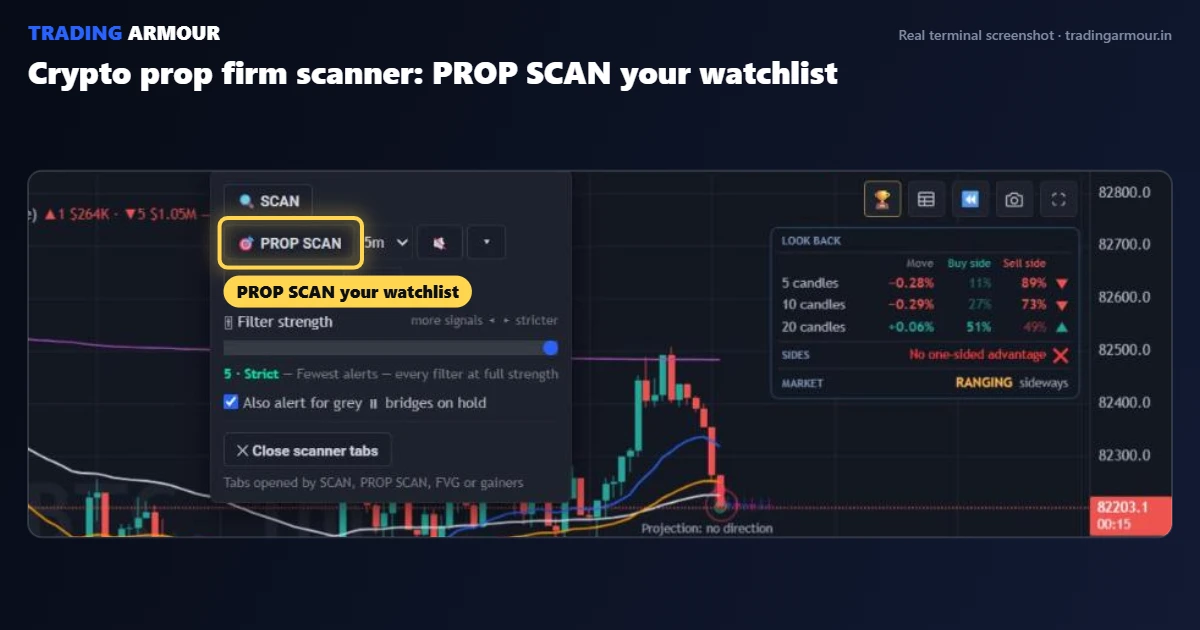
How PROP SCAN works
Basically, PROP SCAN uses the same engine as the main scanner. Every minute, it checks each coin on your list for a fresh closed-candle BUY or SELL.
- When a setup appears, it rings an alarm and flashes that tab.
- The coin opens with the entry, stop loss and targets on the chart.
- One button opens the 10 biggest gainers from your list in the last 24 hours.
- You choose the timeframe it checks, for example 5 minutes.
Then, if more than 13 AI agents agree on one of those tabs, it flashes again and draws the full plan. So the strongest setups stand out from the rest.
Setting up your crypto prop firm scanner
- Open the Scanners menu and the PROP SCAN panel.
- Paste the coins your firm allows, separated by spaces, for example LDO PNUT TAO AVAX.
- Pick a timeframe. Five minutes is a calm choice for beginners.
- Turn PROP SCAN on, and click once on the page so the alarm can play.
Before that, check your firm’s current coin list. For example, Breakout publishes its program rules and allowed markets. Lists change, so update yours when the firm does.
Trading Armour draws the entry, stop loss and two take profit targets on every signal. Also, it runs in your browser for Bybit and Binance futures.
Using alerts inside the prop firm rules
A crypto prop firm scanner finds trades. However, it does not protect your account. Instead, that job belongs to your risk rules.
Most evaluations fail on the daily loss limit or the maximum drawdown, not on a lack of signals. So risk a small, fixed amount per trade, and stop for the day after two losses. For more, our guide on how to pass a crypto prop firm challenge covers the full plan.
Also, remember that the evaluation runs on the firm’s platform. You place those orders yourself, so the scanner is your spotter, not your trader.
A sample day with a crypto prop firm scanner
Here is a calm routine. First, open the terminal before the London session and start PROP SCAN on 5 minutes. Then step away and let it watch.
At 09:40, the alarm rings on AVAX. The signal is one candle old, the AI verdict agrees, and price is still near the entry. So you size the trade at your fixed risk and place it on the firm’s platform.
Later, a second alert rings on a coin stuck in a tight range. This time you skip it, because choppy ranges hunt stops. By noon, then, you have one trade and no stress. That is a good day.
Common mistakes with prop scanners
- Taking every alert. Instead, take only fresh ones where the AI agrees.
- Adding coins the firm does not list. Those trades cannot count toward your target.
- Raising size after a win. Keep the same risk all day, win or lose.
- Trading thin hours. Wicks are bigger at night, so stops get hit more often.
Each mistake is small on its own. Together, however, they fail more challenges than bad signals ever do.
Gainers: useful, but handle with care
The top gainers button is a fast way to find movement. However, a coin that is already up 20% has done the easy part of its move. Therefore, wait for a pullback and a fresh signal instead of buying the top.
Before entering, check the range and the stop. Also, our guide on stop loss hunting shows where stops are safer on fast coins.
Crypto prop firm scanner FAQ
What is PROP SCAN?
PROP SCAN is the Trading Armour scanner for prop traders. It checks only the coins on your own list every minute. Then it alerts you when a fresh BUY or SELL appears.
Can the terminal place trades on my prop firm account?
No. Prop firm evaluations run on the firm’s own platform, so you place those orders yourself. The scanner finds the setup and draws the plan.
Which coins should I add to my list?
Only the coins your prop firm currently allows. Check the firm’s rules page and update your list whenever it changes.
- Pass a crypto prop firm challengeA rule-first plan, because daily loss limits fail more accounts than bad entries.
- AI crypto signal scannerLet a scanner watch 120 coins, so an alarm rings when a setup appears.
- Scalping risk managementSeven plain rules, because risk control keeps a scalping account alive.
- Position size calculatorFree calculator: turn your risk and stop into an exact size, so losses stay fixed.