Binance stop loss bot: a real stop on every futures trade
A Binance stop loss bot makes sure every futures trade has a real stop on the exchange. So one bad move cannot turn a small loss into a big one.
This guide explains why manual stops fail. Then it shows how the Trading Armour panel protects each trade on Binance, and which settings matter most.
- A Binance stop loss bot sends a real stop to Binance together with every entry.
- A watchdog then checks the stop and puts it back if it is missing.
- Also, a daily loss limit halts trading when a bad day goes too far.
- Isolated margin keeps each loss inside its own trade, so the rest of the balance stays safe.
Why manual stops fail
At first, most traders plan a stop. Then price moves toward it, and they hesitate. Maybe it will turn, they think. So they move the stop or remove it, and a small loss grows.
Mental stops also fail for simple reasons. For example, your internet drops, your phone dies, or you fall asleep. Indeed, in fast crypto markets even ten minutes without a stop can hurt.
For this reason, a stop should be an order on the exchange, placed at the same moment as the entry.
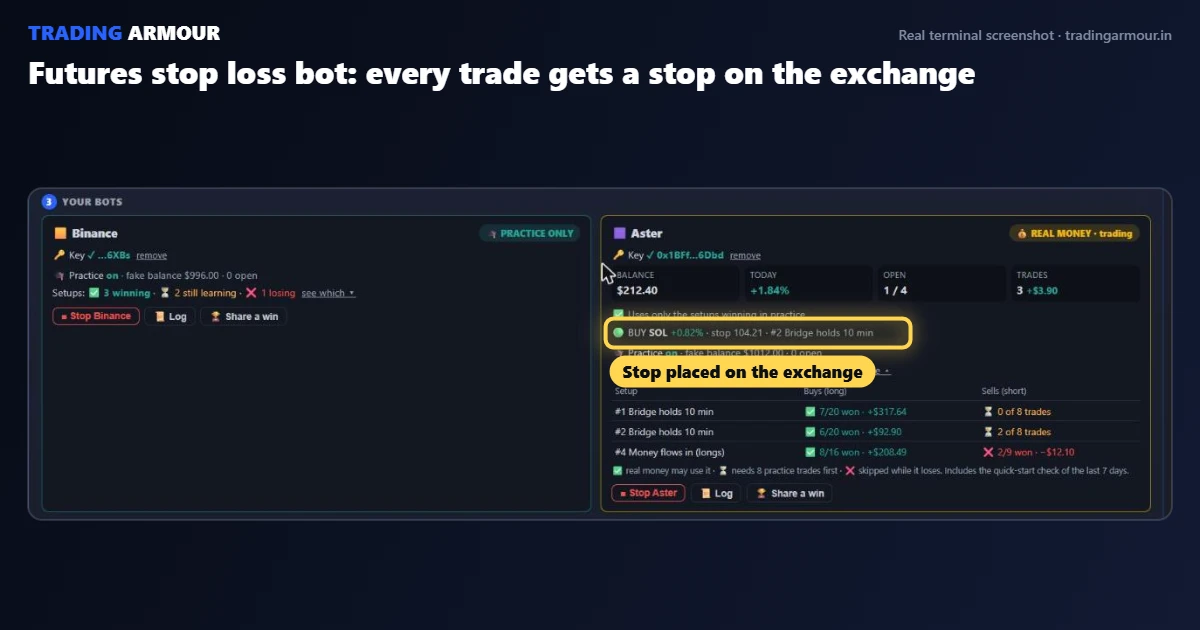
How the Binance stop loss bot protects a trade
In Trading Armour, you connect a Binance futures API key and pick Binance in the bot panel. Then, when you enter from a signal, the panel sends the stop together with the trade.
- Real stop: the stop sits on Binance, not in your browser.
- Watchdog: the panel checks the stop is still there, and puts it back if it is missing.
- Break-even: at Target 1, half closes and the stop moves to entry.
- Trailing: after that, the stop follows price and never moves back.
Also, trades use isolated margin. As a result, a loss on one trade cannot pull from the rest of your futures balance.
Daily loss limit: the stop for your whole day
Of course, one stop protects only one trade. However, a run of losses can still hurt. So the bot panel also has a daily loss limit in dollars.
When your losses for the day reach that number, trading halts. Then a banner tells you the limit was hit, and you reset it yourself in Settings the next day.
This rule is simple, yet it stops revenge trading cold. For example, with a $500 account you might set a $15 daily limit. Two or three losses later, you are done for the day, and the account survives.
Trading Armour draws the entry, stop loss and two take profit targets on every signal. Also, it runs in your browser for Bybit and Binance futures.
Binance stop loss bot settings
| Setting | What it does | Beginner value |
|---|---|---|
| Risk per trade | Sizes each position | 0.5% to 1% of the account |
| Daily loss $ | Halts trading for the day | 2 to 3 times your risk per trade |
| Leverage | Sets margin used | Low, such as 3x to 5x |
| Margin mode | Limits loss to one trade | Isolated |
Leverage does not change your risk when the stop and size are right. Still, lower leverage keeps your liquidation price far from the stop. So the stop, not the exchange, decides when you exit.
Full automation with AUTO TRADE
Some traders want the bot to choose trades too. So for them, the optional AUTO TRADE mode scans the top 120 Binance coins. Then it enters only when more than 13 AI agents agree.
Even then, the same protections apply. Every trade gets a stop, Target 1 banks half, and the daily loss limit halts everything. In addition, our AI crypto trading agents guide explains how that vote works.
Still, start small. Watch the bot for a few days before you trust it with more money.
Setting up the API key safely
- In Binance, create an API key with futures trading enabled.
- Next, keep withdrawals disabled. The bot never needs them.
- Then paste the key and secret into the bot panel and press Save and Connect.
- Finally, place one tiny test trade and check that the stop shows on Binance.
Also, your keys stay in your own browser. If you trade on Bybit instead, the Bybit trailing stop bot guide covers the same setup there.
Binance stop loss bot questions
Does the stop stay on Binance if I close the browser?
Yes. The stop is a real order on Binance. Break-even and trailing moves need the terminal open, but the stop itself stays on the exchange.
What happens when I hit the daily loss limit?
Trading halts and a banner shows the limit was hit. You reset it yourself in Settings, usually the next day.
Can I use the stop loss bot without AUTO TRADE?
Yes. Most traders enter by hand from a signal, and the panel then places and manages the stop for them.
- Bybit trailing stop botLet the stop follow price, so profit stays locked in as the trade runs.
- Position size calculatorFree calculator: turn your risk and stop into an exact size, so losses stay fixed.
- Scalping risk managementSeven plain rules, because risk control keeps a scalping account alive.
- AI crypto trading agentsHow 20+ AI agents vote, and why one plain verdict beats twenty opinions.